Table of Contents
SSH and SMB storage access
This service is expected to be shutdown in december 2018. Please, use Nextcloud instead from now on.
Description
Access to NFS shared storage using Samba (CIFS) and SSH (including SFTP).
Activation
The service is activated automatically for all users with NFS shared storage access. The authentication credentials are the CITIUS ones. If you don't remember them you can request a reactivation in citius.tic@usc.es.
Help
SFTP/SSH
Access info:
- Server:
172.16.242.41 - Port:
22
Accessible folders:
- User directories:
/homes/user.name - Project directories:
/proyectos/project.name - Shared directories:
/compartidas/owner.user.name/folder.name - Scratch:
/scratch
Examples:
ssh://172.16.242.41/homes/jorge.suarezssh://172.16.242.41/compartidas/jorge.suarez/fotos
Connect from Ubuntu
- Open a file explorer window. Access the menú:
Files » Connect to server. - Choose Type
SSH. Fill in the server data172.16.242.41, Folder/homes/user.nameand username and password. Lastly, pushConnect.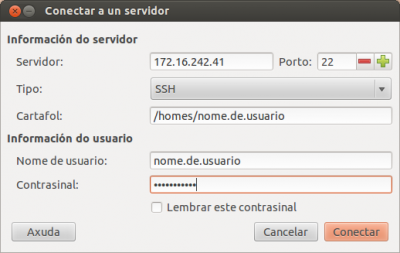
- To access a project directory, use the folder
/proyectos/project.nameand to access scratch use/scratch.
Connect from Windows
You can use the program WinSCP using the same connection data as in Ubuntu.
Samba/SMB/CIFS access
Important: If your password is not working, check if you can login at the citius web page. If you can but that same password does not work for Samba/SMB/CIFS you must reset your password(passwords older than July 2012 won't work).
Access info:
- Server:
172.16.242.41
Accessible folders:
- User directories:
user.name - Project directories:
project.name - Shared directories:
compartidas/owner.user.name/folder.name - Scratch:
scratch
Connect from Ubuntu
- Open a file explorer window. Access the menú:
Files » Connect to server. - Choose Type
Windows share. Fill in the server data172.16.242.41, DomainCITIUS, Folderuser.nameand username and password. Lastly, pushConnect.
- To access a project directory, use the folder
project.nameand to access scratch usescratch.
Connect from Windows 7
- Start menu » Computer » Map network drive
- Fill in the info. Choose any Drive letter you want and in Folder write
\\172.16.242.41\user.nameand push Finish. Introduce your CITIUS password when asked for.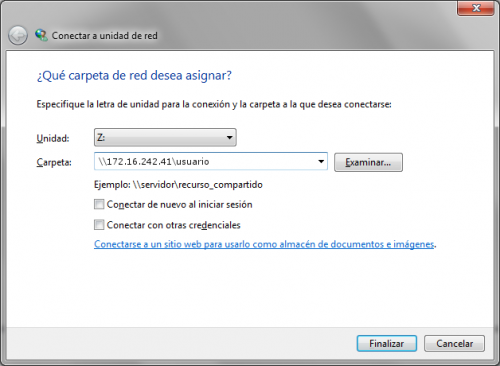
- To access the project directories, write
\\172.16.242.41\project.nameand to access scratch\\172.16.242.41\scratch.
FAQ
¿Can I access from a network outside the CITIUS?
Yes, using the SSH gateway or the VPN.